Useful Methods for Effective Data Analytics
- Authors
- Name
- Andy Cao


Table of content
This article draws inspiration from "What are the most important statistical ideas of the past 50 years?" by Andrew Gelman and Aki Vehtari. The content has been adapted and refined for a business analytics context with the assistance of AI tools.


Although generative AI frequently attracts significant attention within data science, it is necessary to acknowledge the continuing relevance of traditional analytic techniques that have been refined over decades. These methods are particularly suited to routine, straightforward data analysis and often complement contemporary approaches. In business analytics—where clarity, reliability and practicality are critical—these established techniques provide accessible solutions for everyday analytical tasks. They can effectively summarise trends, verify correlations and support data-driven decisions, consistently delivering valuable insights for common analytical needs. Here I highlight five such methods that remain highly relevant in the field of data analytics:
1. Exploratory Data Analysis (EDA)
Exploratory Data Analysis (EDA) emphasises open-ended exploration and graphical methods for understanding and summarising data, rather than relying solely on formal statistical tests and regression modelling. EDA typically involves visual techniques such as histograms, scatterplots, and boxplots to uncover patterns, trends, and potential anomalies in the dataset.
In data analytics, EDA is indispensable for understanding the often complex nature of revenue and marketing datasets, detecting outliers , and identifying potential relationships among variables such as advertising spend, website traffic, and sales.
General EDA steps include:
- Data Collection and Pre-processing: Gathering relevant data and cleaning it (handling missing values, duplicates, etc.).
- Univariate Analysis: Examining the distribution of each variable.
- Bivariate Analysis: Investigating relationships between pairs of variables.
- Multivariate Analysis: Using techniques like principal component analysis or clustering.
- Hypothesis Testing and Model Exploration: Forming and testing hypotheses; exploring different models to capture patterns.
- Reporting and Visualisation: Presenting findings, often through interactive visual tools.

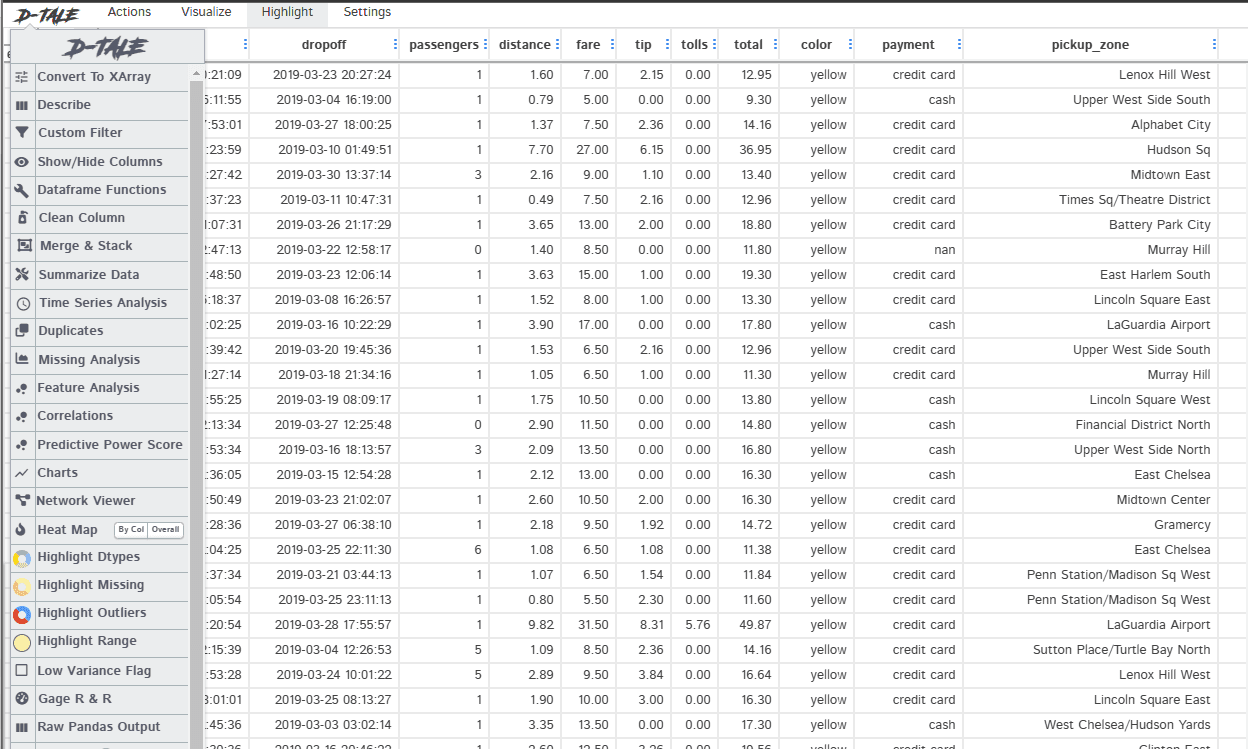
Click to see the code
# pip install dtale
import dtale as dt
import seaborn as sns

df = sns.load_dataset('taxis')

d = dt.show(df)
d.open_browser()
2. Counterfactual Causal Inference
Counterfactual causal inference is a method for drawing causal conclusions from observational data. In simpler terms, it allows us to determine the effect of an intervention or treatment on a particular outcome, even without conducting a randomised controlled trial. This is typically done by comparing observed outcomes with the outcomes that would have been observed in the absence of the intervention.
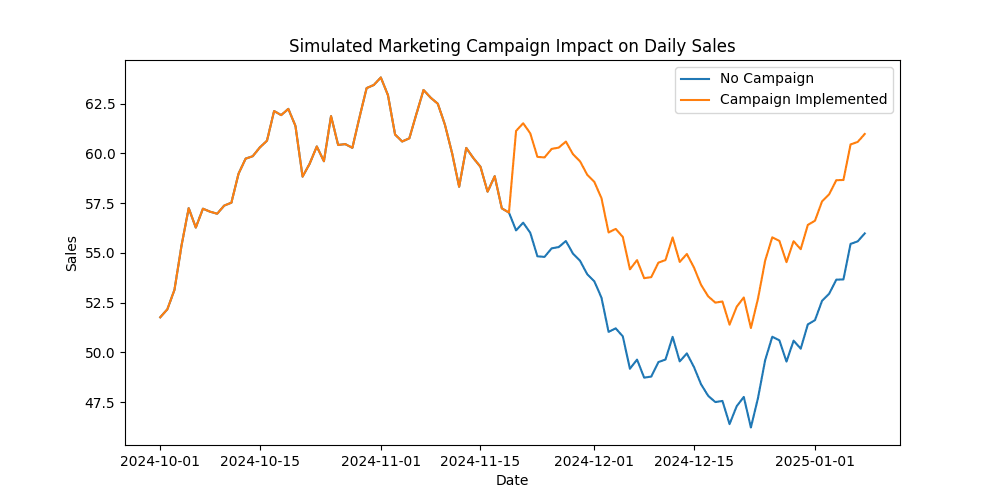
For instance, suppose we want to evaluate the impact of a new marketing campaign on daily online store sales. We compare the sales in stores that ran the campaign with those in a comparable group of stores that did not. By contrasting these two groups, we can estimate the campaign's effect.
Counterfactual causal inference is well developed in fields such as econometrics, epidemiology, and psychology, offering a refined framework for making causal assumptions and advancing new statistical methods to address causal questions.
In business analytics, randomised experiments might not always be feasible (e.g., due to cost or operational constraints). Counterfactual causal inference thus becomes an essential tool, allowing us to derive causal insights from observational data. For example, if we want to examine how an online promotional discount affects daily website sales, we can compare the post-discount sales numbers against a counterfactual scenario simulated from historical data without the discount.

Click to see the code
import numpy as np
import pandas as pd
import statsmodels.api as sm
import matplotlib.pyplot as plt

# Display minus signs properly
from pylab import mpl
mpl.rcParams['axes.unicode_minus'] = False

# Sample historical daily sales data
np.random.seed(0)
dates = pd.date_range('20241001', periods=100)
sales = pd.Series(np.random.randn(100).cumsum() + 50, index=dates, name='DailySales')

# Introduce a campaign effect from day 50 onwards
campaign_effect = 5
sales_with_campaign = sales.copy()
sales_with_campaign.iloc[50:] += campaign_effect

# Visualize the change
plt.figure(figsize=(10, 5))
plt.plot(sales, label='No Campaign')
plt.plot(sales_with_campaign, label='Campaign Implemented')
plt.title('Simulated Marketing Campaign Impact on Daily Sales')
plt.xlabel('Date')
plt.ylabel('Sales')
plt.legend()
plt.show()

# Estimate total campaign impact via a simple linear regression
X = sm.add_constant(np.arange(len(sales)))
model = sm.OLS(sales_with_campaign, X).fit()
campaign_impact_estimate = model.params[1] * 50  # Approximate total impact from day 50

print(f'Estimated campaign impact on daily sales: {campaign_impact_estimate:.2f}')
3. Bootstrapping & Simulation-Based Inference
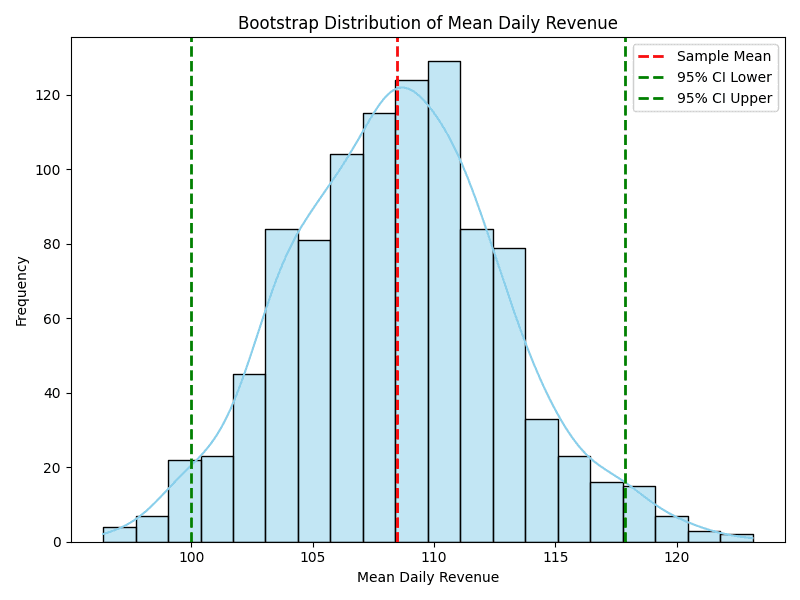
Bootstrapping is a non-parametric resampling technique that involves drawing samples with replacement from the original dataset to estimate the sampling distribution of statistics like the mean or standard deviation, as well as to construct confidence intervals. Simulation-based inference is a broader category that uses simulation—either by resampling from the model or generating replicated datasets—to facilitate inference in cases where traditional methods may be inapplicable or where the data are particularly complex.
Improvements in computational power over recent decades have allowed these techniques to gain wide acceptance, enabling more complex and accurate inference. In business analytics, bootstrapping and simulation-based methods are especially valuable when dealing with non-normal data, limited samples, or highly complex structures.
Example: Bootstrapping to Estimate Confidence Intervals

Click to see the full code
import numpy as np
import matplotlib.pyplot as plt
import seaborn as sns

# Set random seed for reproducibility
np.random.seed(42)

# Sample historical daily revenue
historical_revenue = np.array([100, 120, 90, 130, 110, 105, 115, 98])

# Set bootstrap parameters
num_samples = 1000
bootstrap_samples = np.random.choice(
    historical_revenue,
    (num_samples, len(historical_revenue)),
    replace=True
)

# Compute mean revenue for each bootstrap sample
bootstrap_means = np.mean(bootstrap_samples, axis=1)

# Calculate confidence interval
alpha = 0.05
lower_bound = np.percentile(bootstrap_means, 100 * alpha / 2)
upper_bound = np.percentile(bootstrap_means, 100 * (1 - alpha / 2))

print(f"Confidence interval for daily revenue: [{lower_bound:.2f}, {upper_bound:.2f}]")

# --- Plotting the Results ---
plt.figure(figsize=(8,6))
sns.histplot(bootstrap_means, kde=True, color='skyblue', bins=20)

# Plot the sample mean of the original data
sample_mean = np.mean(historical_revenue)
plt.axvline(sample_mean, color='red', linestyle='--', linewidth=2, label='Sample Mean')

# Plot the lower and upper CI bounds
plt.axvline(lower_bound, color='green', linestyle='--', linewidth=2, label='95% CI Lower')
plt.axvline(upper_bound, color='green', linestyle='--', linewidth=2, label='95% CI Upper')

plt.title("Bootstrap Distribution of Mean Daily Revenue")
plt.xlabel("Mean Daily Revenue")
plt.ylabel("Frequency")
plt.legend()
plt.tight_layout()
plt.show()
4. Over-Parameterised Models & Regularisation
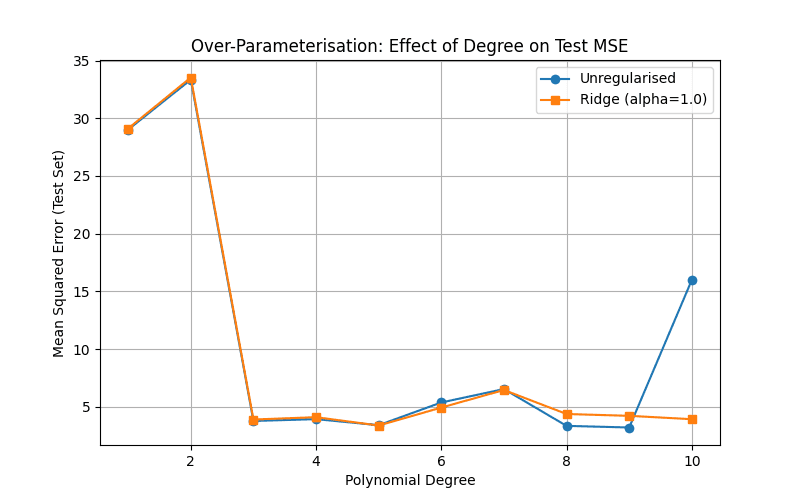
Over-parameterised models are those with very large numbers of parameters—sometimes more than data points. Regularisation techniques help guard against overfitting by penalising the magnitude or complexity of model parameters. Examples include splines, Gaussian processes, trees, neural networks, and support vector machines.
The surge in computing power has made fitting and regularising these models more practical, particularly in deep learning. Advances such as stacking, Bayesian model averaging, boosting, gradient boosting, and random forests have also increased prediction accuracy and robustness.

Click to see the full code
import numpy as np
import pandas as pd
import matplotlib.pyplot as plt
from sklearn.linear_model import LinearRegression, Ridge
from sklearn.preprocessing import PolynomialFeatures
from sklearn.model_selection import train_test_split
from sklearn.metrics import mean_squared_error

# 1. Generate synthetic data
#    (e.g., y = x^3 - 2x + some noise)
np.random.seed(42)
X = np.linspace(-3, 3, 40).reshape(-1, 1)             # 40 points from -3 to 3
y = (X**3 - 2*X + np.random.randn(*X.shape)*2).ravel()  # polynomial + noise

# 2. Train/test split
X_train, X_test, y_train, y_test = train_test_split(
    X, y, test_size=0.25, random_state=42
)

# 3. Compare polynomial regression (unregularised) vs. Ridge at different polynomial degrees
max_degree = 10
degrees = list(range(1, max_degree+1))

test_mse_unreg = []
test_mse_ridge = []

for deg in degrees:
    # -- Create polynomial features up to degree 'deg' --
    poly = PolynomialFeatures(degree=deg)
    X_train_poly = poly.fit_transform(X_train)
    X_test_poly = poly.transform(X_test)

    # -- Unregularised Linear Regression --
    linreg = LinearRegression()
    linreg.fit(X_train_poly, y_train)
    y_pred_linreg = linreg.predict(X_test_poly)
    test_mse_unreg.append(mean_squared_error(y_test, y_pred_linreg))

    # -- Ridge Regression (alpha = 1.0 for illustration) --
    ridge = Ridge(alpha=1.0)
    ridge.fit(X_train_poly, y_train)
    y_pred_ridge = ridge.predict(X_test_poly)
    test_mse_ridge.append(mean_squared_error(y_test, y_pred_ridge))

# 4. Plot Test MSE vs. Polynomial Degree
plt.figure(figsize=(8, 5))
plt.plot(degrees, test_mse_unreg, marker='o', label='Unregularised')
plt.plot(degrees, test_mse_ridge, marker='s', label='Ridge (alpha=1.0)')
plt.title("Over-Parameterisation: Effect of Degree on Test MSE")
plt.xlabel("Polynomial Degree")
plt.ylabel("Mean Squared Error (Test Set)")
plt.legend()
plt.grid(True)
plt.show()
5. Multilevel Models
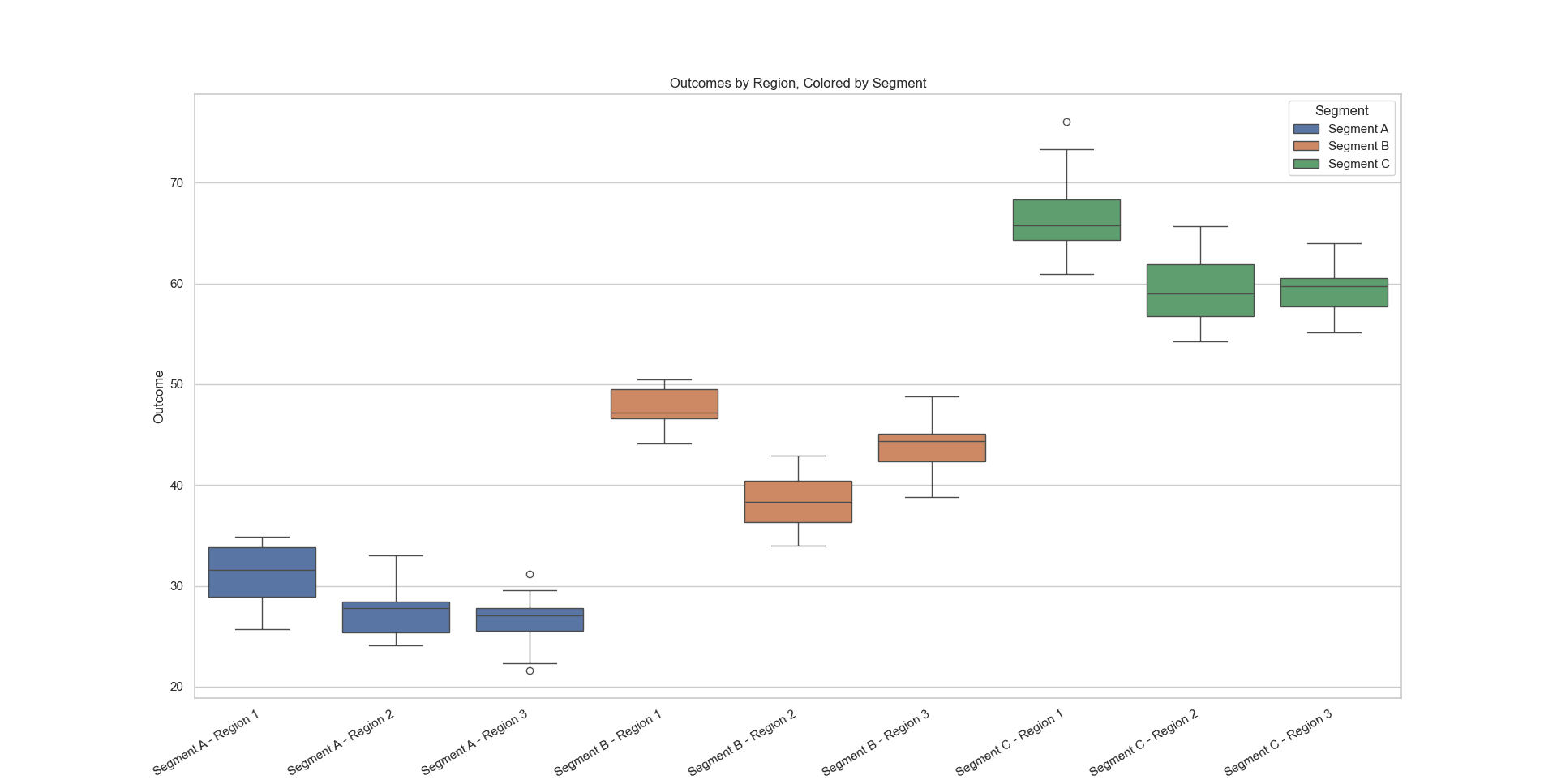
Multilevel modelling (also called hierarchical or mixed-effects modelling) is suited to structured or nested data. It can capture variation at multiple levels, such as in a scenario where individual customers are grouped into regions and regions are grouped into broader market segments. Multilevel models accurately represent group-level effects while estimating the impact of predictors.
In business analytics, multilevel models can accommodate the hierarchy inherent in organizational data—for example, sales data from stores nested within different cities or regions. This layering allows for more precise estimation of factors that influence performance, providing a holistic view of how various predictors interact across multiple tiers.

Click to see the full code
import pandas as pd
import statsmodels.formula.api as smf
import warnings

data = pd.DataFrame({
    'region': ['North', 'South', 'North', 'East', 'South'],
    'market_segment': ['Online', 'Offline', 'Online', 'Offline', 'Offline'],
    'daily_sales': [120, 150, 130, 90, 140],
    'avg_discount': [10, 15, 12, 5, 8],
    'web_visits': [1000, 500, 1200, 300, 600]
})

# Fit a linear mixed-effects model
model = smf.mixedlm("daily_sales ~ avg_discount + web_visits", data, groups="region")
result = model.fit()
print(result.summary())